CSV Studio Pro

Every check a messy file needs, in one app.

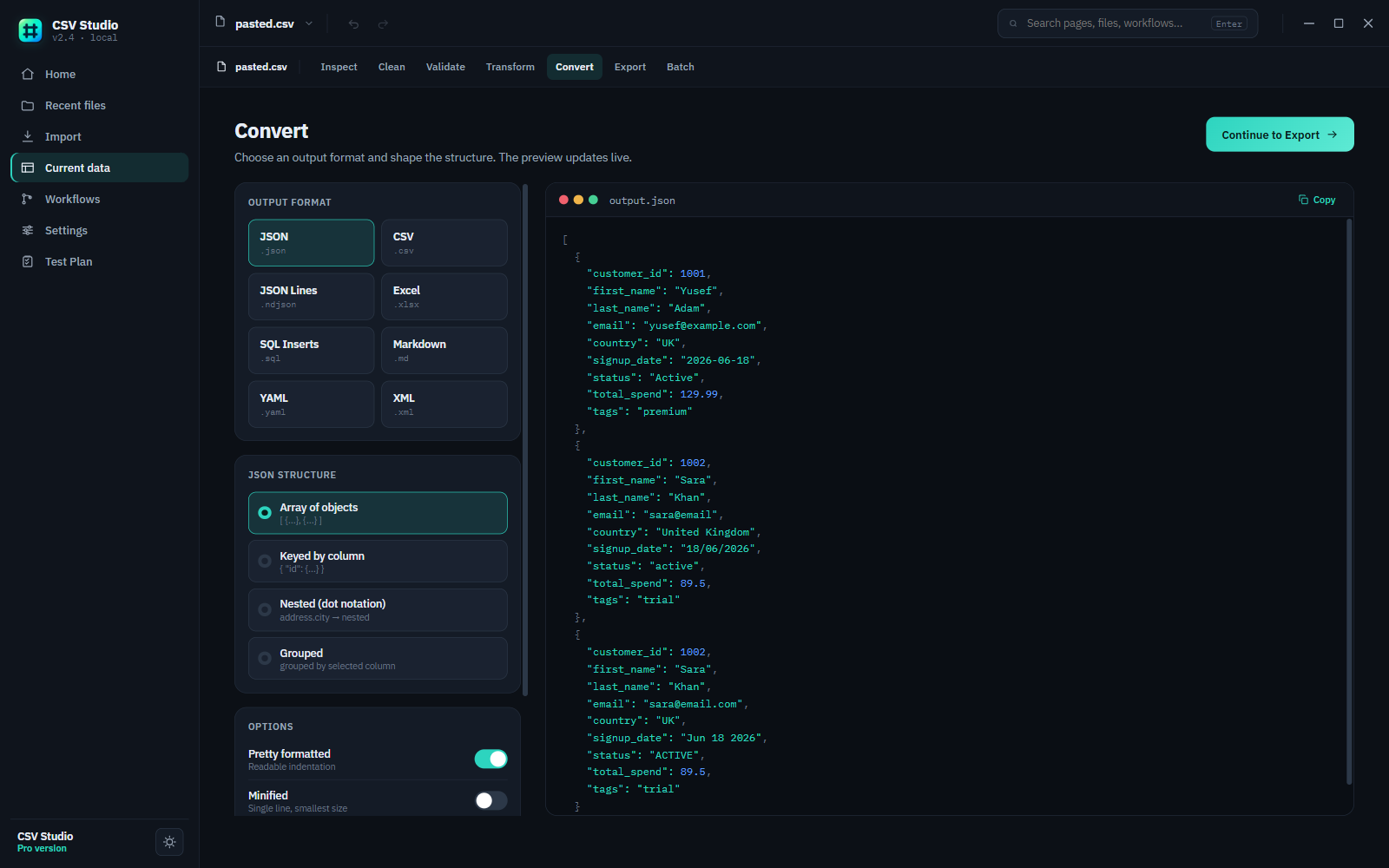
Row 4,182 has an extra comma. Two rows share the same ID. Half the dates read 03/12/2024, the rest read 2024-03-12. CSV Studio Pro finds all of it, and lets you fix it before it becomes someone else's problem.

✓ one-time purchase, £29 ✓ Windows desktop app ✓ files never leave your machine
CSV Studio Pro Validate screen showing a flagged duplicate customer ID with fix and ignore actions
What it does

Six things, done in the right order.

Import, table, clean, validate, transform, convert — one workflow, not six separate tools.

Import & preview

Bring in CSV or TSV files, browse or drag-and-drop, and preview the real data before you commit to anything.

Table editing

Filter, sort, hide columns, and edit cells directly in a full data table — with undo and redo throughout.

Cleaning

Trim whitespace, drop blank or duplicate rows, normalize casing and quotes, strip invisible characters, standardize dates.

Validation

Flags missing required values, duplicate IDs, malformed emails, ambiguous or invalid dates, and out-of-range enum values — with a fix suggested for each.

Transformation

Rename, reorder, remove, merge, split, and compute columns, extract values, nest into JSON structures, or group rows.

Batch & workflows

Save a sequence of clean/validate/transform/convert/export steps as a workflow and run it across many files.

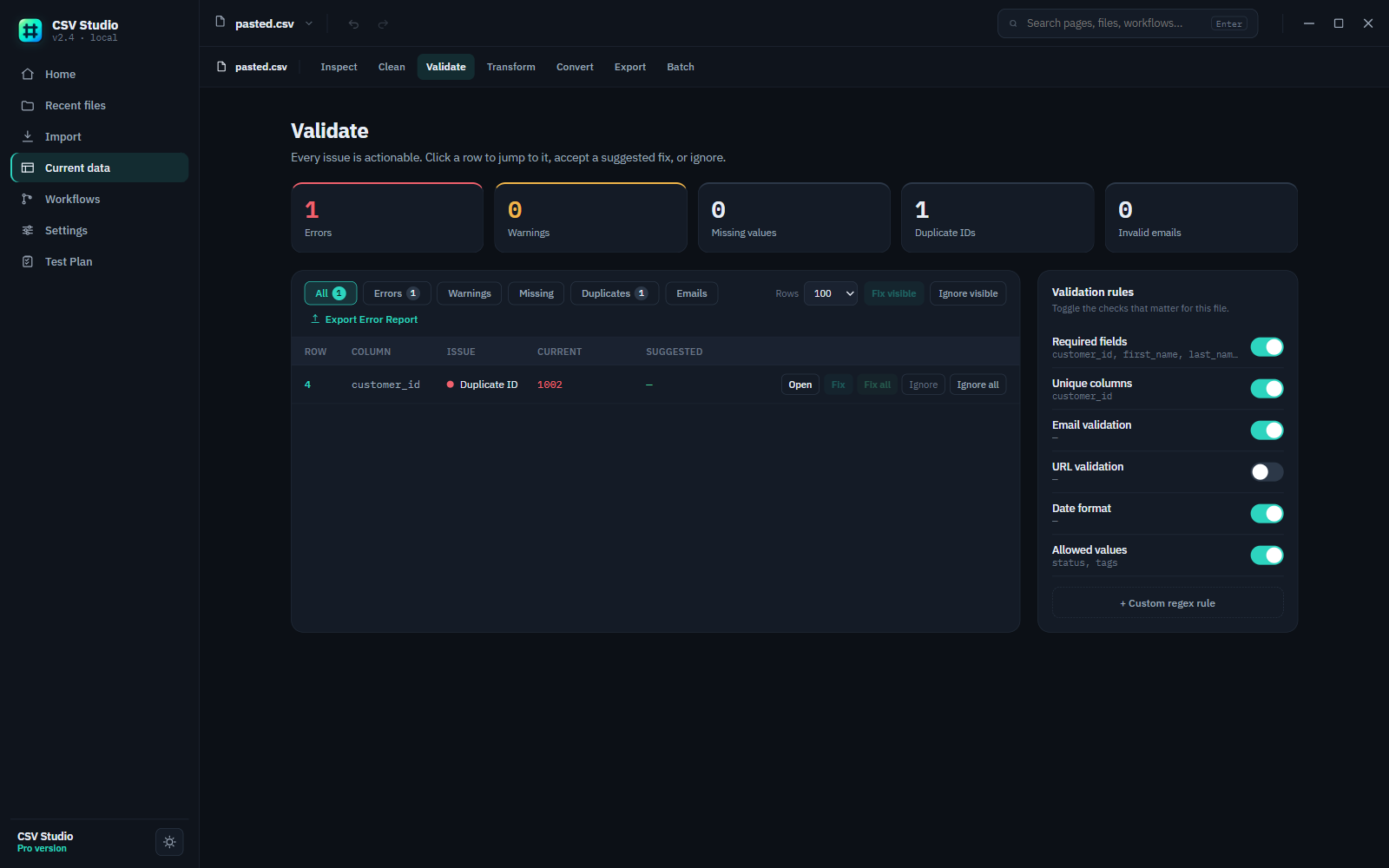
CSV Studio Pro Convert screen showing a CSV file being converted to structured JSON with a live preview
Export as

Get your data out in the format you need.

.json .xlsx .sql .yaml .xml .md .csv .zip — split files
Pricing

One price. Yours forever.

No subscription, no tiers to compare every year, no account to manage. Start free, pay once through Paddle if you upgrade.

Free tier

CSV Studio Free

£0

Open, clean, validate, transform, and export CSV/TSV files locally — the everyday toolkit, no card required.

  • CSV and TSV import
  • Table preview and editing
  • Data cleaning (trim, dedupe, normalize dates, more)
  • Validation — missing values, duplicate IDs, email and date checks
  • Column rename, reorder, and remove
  • JSON and CSV export
  • Local, private file processing
  • Undo and redo support
Download for free →
Pro tier — one-time

CSV Studio Pro

£29 once, via Paddle

Everything in Free, plus the power tools for reshaping data and running the same job across many files.

  • Custom regex validation rules and error report export
  • Column merge, split, computed columns, regex extract, JSON nesting, grouping
  • JSON, Excel, SQL, YAML, XML, and Markdown export
  • Batch conversion across many files
  • ZIP and split-file exports
  • Saved workflows and export presets
  • Undo and redo throughout
Get Pro — £29 →

Free and Pro are the same download — buy Pro and a license key unlocks the full toolkit in the same app, no reinstall needed. Purchases are processed securely by Paddle; there's no separate account or login for CSV Studio itself.

For developers

Agent-ready — CSV Studio has an MCP server built in.

An AI coding agent (Claude Code, Claude Desktop, or anything else that speaks MCP) can drive the same engine the desktop app uses, straight from the command line — inspect a file, clean it, validate it, transform it, convert it, or batch-process a folder.

csv_inspect csv_convert csv_clean csv_validate csv_transform csv_batch csv_license_status
claude mcp add csv-studio -- node /path/to/csv-studio/mcp/server.js

Free-tier tools work with no license; Pro-gated tools (batch conversion, the reshaping transforms, custom validation rules) check the same license as the desktop app.

Questions

FAQ

Every screen and setting is covered in the CSV Studio docs & support page.

What operating systems does CSV Studio Pro support?

Windows. It's a desktop app installed from a setup file and runs offline once installed.

Does it upload my data anywhere?

No. Every operation — cleaning, validation, conversion — runs locally on your computer. Files are never sent to DataForge Tools or any third party.

How do I unlock Pro after buying?

Your license key arrives by email right after checkout, with an Activate button that unlocks the app automatically if it's already installed. Prefer to do it by hand? Paste the key into Settings → License instead. Either way, there's no separate account or activation server.

Is there a limit on file size or row count?

No hard limit — CSV Studio streams large files in chunks rather than loading everything into memory at once, so it stays responsive on files well beyond what Excel can comfortably open.

What happens to a format CSV Studio can't fully represent — like nested JSON going to CSV?

Nested objects flatten to dot-notation columns (e.g. address.city), and arrays join into a single delimited cell. Going the other way, the JSON export's "Nested" structure mode reverses that automatically for columns already using dot notation.

Is this really a one-time purchase?

Yes. £29 once via Paddle for CSV Studio Pro. No recurring billing, no seat renewals.

Can I upgrade from Free to Pro later?

Yes. Buy the Pro license from the pricing section above whenever you're ready — checkout opens right here, no separate storefront to visit.

I lost my license key — now what?

Head to Recover your license and enter the email you paid with plus the transaction ID from your Paddle receipt — we'll re-send the license email straight away.

Stop fighting your spreadsheets.

One-time purchase. Runs locally. No account required.

Get CSV Studio Pro