Magpie — one app for Windows

Everything you've copied, one keystroke away.

Magpie runs quietly in the system tray, captures everything you copy — text, images, files, folder paths, colors, links — and gives it back instantly through a keyboard-driven overlay. The thing you copied twenty minutes ago is never gone.

✓ free to use ✓ Windows desktop app ✓ history stays on your machine
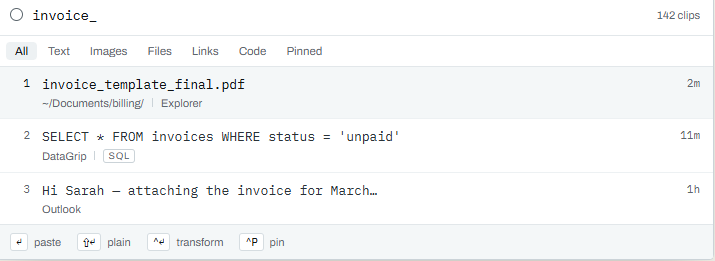
The Magpie overlay summoned over another app, filtering clip history as you type
What it does

Six things, without leaving the keyboard.

Remember, find, reuse, reshape, sequence, and deliberately forget — one overlay, one hotkey.

Remember

Every copy is captured automatically — plain text, rich text, HTML, images, files, folder paths, and colors — each tagged with its type, time, and the app it came from.

Find

Ctrl+Shift+V opens an overlay over whatever you're doing. Type to fuzzy-search your whole history, arrow keys to move, Enter to paste, Esc to vanish.

Reuse

Pin the clips you keep coming back to, group related clips into collections, and author your own reusable snippets — email templates, addresses, code blocks — in the same list.

Reshape

Strip formatting, change case, trim whitespace, format JSON, encode or decode base64 and URLs, sort or dedupe lines — before the content lands, with no round-trip through an editor.

Sequence

Copy five things in a row, then paste them in order into five fields. Stacks turn a repetitive copy-paste-switch loop into copy-copy-copy, then paste-paste-paste.

Forget, deliberately

Password managers and banking apps are excluded by default. Sensitive-looking content is detected and never written to disk. One toggle pauses capture entirely.
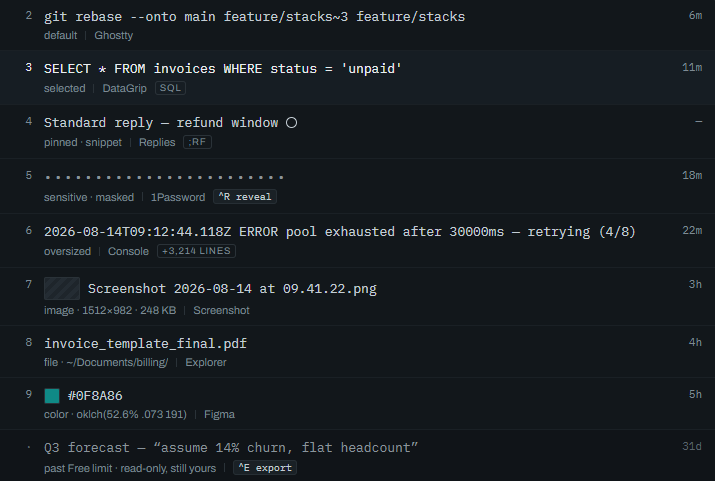
A range of captured clips in the Magpie overlay — text, a color swatch, a file path, a link
Every kind of clip

One list, whatever you copied.

Each clip is tagged with its type, time, and source app. Colors carry a swatch, links open, files show their path, oversized clips are folded, and anything that looks sensitive stays masked.

text rich text images files folder paths colors links snippets
Pricing

Free to use. Pro is on the way.

Magpie is a free clipboard manager today. A paid Pro tier is planned for the power-user features — and privacy is never one of them.

Free — available now

Magpie

£0

The full daily clipboard manager. Capture, search, the overlay, pinning, collections, snippets, on-paste transforms, and every privacy feature.

  • Automatic capture of text, rich text, images, files, folder paths, colors, and links
  • Ctrl+Shift+V overlay with fuzzy search, keyboard navigation, and quick keys for the top nine
  • Pins, collections, and your own snippets in one list
  • On-paste transforms — plain text, case, whitespace, sort, dedupe
  • Type and source-app filters, clip preview, and a metadata panel
  • History kept 30 days / 1,000 clips
Download for free →
Pro — planned

Magpie Pro

TBA

A one-time purchase for the power tools, in keeping with how every DataForge tool is sold. Not available yet — this is the roadmap.

  • Unlimited history retention with per-type and per-source rules
  • Paste queues (Stacks) and per-action hotkeys
  • Text expansion and a rules engine
  • Regex search and image-OCR search
  • Code-language and structured-data detection
  • End-to-end encrypted sync across your machines
See what's planned →

Privacy and data ownership are never paid features: app exclusions, sensitive-content detection, encryption at rest, and full data export stay free at every tier. Magpie processes and stores your clipboard history locally — nothing is uploaded to DataForge Tools or any third party.

Questions

FAQ

The overlay, capture, transforms, privacy, and retention are all covered in the Magpie docs & support page.

What operating systems does Magpie support?

Windows. It's a desktop app installed from a setup file. Magpie has no window of its own — it lives in the system tray, and Ctrl+Shift+V summons the overlay.

Is my clipboard history uploaded anywhere?

No. Magpie processes and stores your history locally on your computer. Nothing is sent to DataForge Tools or a third-party service by the app. The local store is encrypted at rest.

What stops it from capturing passwords?

Password managers and banking apps are excluded out of the box, and content that looks sensitive is detected at capture time and never written to disk. One toggle pauses all capture, and you can set retention rules to delete old clips on a schedule.

Is the free version a trial?

No. Free is a real tier with no time limit — the whole daily clipboard manager, including every privacy feature. Pro (planned) adds power-user features like unlimited retention, Stacks, text expansion, and encrypted sync.

How much will Pro cost, and when?

Pricing and timing aren't set yet. Pro will be a one-time purchase, the same as every other DataForge tool — no subscription. The list above is the planned feature set.

Never lose a copy again.

Runs in the tray. Stays on your machine. Free to use.

Download Magpie