What it does
Six things, without leaving the keyboard.
Remember, find, reuse, reshape, sequence, and deliberately forget — one overlay, one hotkey.
Remember
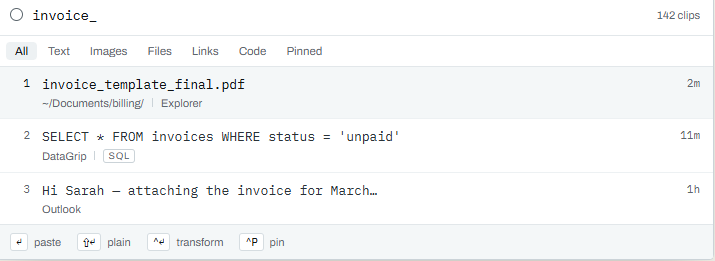
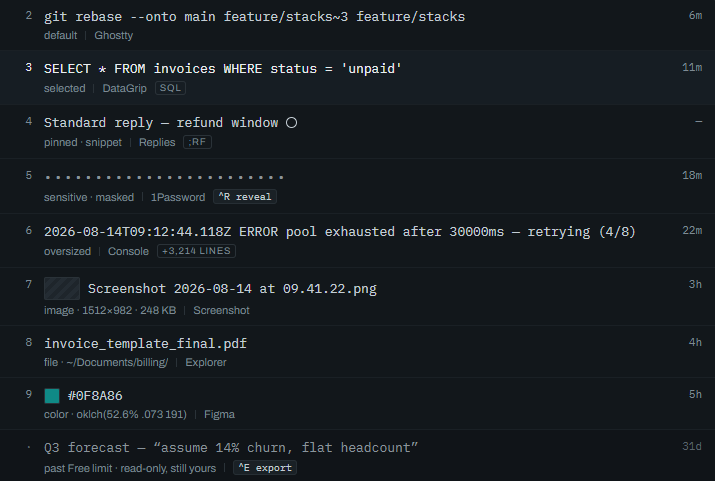
Every copy is captured automatically — plain text, rich text, HTML, images, files, folder paths, and colors — each tagged with its type, time, and the app it came from.
Find
Ctrl+Shift+V opens an overlay over whatever you're doing. Type to fuzzy-search your whole history, arrow keys to move, Enter to paste, Esc to vanish.
Reuse
Pin the clips you keep coming back to, group related clips into collections, and author your own reusable snippets — email templates, addresses, code blocks — in the same list.
Reshape
Strip formatting, change case, trim whitespace, format JSON, encode or decode base64 and URLs, sort or dedupe lines — before the content lands, with no round-trip through an editor.
Sequence
Copy five things in a row, then paste them in order into five fields. Stacks turn a repetitive copy-paste-switch loop into copy-copy-copy, then paste-paste-paste.
Forget, deliberately
Password managers and banking apps are excluded by default. Sensitive-looking content is detected and never written to disk. One toggle pauses capture entirely.